
CakePHP offers a really nice built-in tree management. In fact, at a bare minimum you simply need to create a table with 2 extra columns, tell your model to act like a "tree" and rather than doing a find('all') you do a generatetreelist() or a find('threaded') and CakePHP takes care of the rest.
After doing a quick test, I was quite impressed with what CakePHP did for me, but I was not satisified. I wanted to create a really slick category management system that I can re-use and show off. Well, in this tutorial I go about 90% of the way. The only thing I didn't have time to finish was, rather than redrawing my tree through AJAX, use DHTML and dynamically update my tree after dragging and dropping. Don't worry, I plan to finish this with a part two soon.
Here are a couple of screen shots of the system in action: [caption id="attachment_216" align="aligncenter" width="300" caption="Initial view of system"] [caption id="attachment_217" align="aligncenter" width="300" caption="Dragging a new category"] [caption id="attachment_218" align="aligncenter" width="300" caption="Moving a sub category and it's children"] [caption id="attachment_220" align="aligncenter" width="300" caption="More categories populated"] I know it's not the most beautiful system in the word. But, I hope it drives the point home of how much potential there is with this system. To create all of the code below and do a bit of testing, it took about 3 hours total! A normal category management system of unlimited sub categories would probably take me a couple of days AND there is no way it could match the "coolness" factor of this application. Also, in case the screen shots are not quite clear. To create a new category, type the name in the text box and drag the red rectangle above to where you want to place it. The category it will be placed in will be highlighted in yellow. If you wish to move a category or entire branch, simply drag it and move it to the new category. Ok, let's move on to the actual code. The first thing to do is create our categories table: If you've ever built a category system, the first three columns should look familiar. The key columns here though are the fourth and fifth columns, the lft and rght. CakePHP automatically deals with these columns for us whenever we save or delete data. For a detailed explanation, view this document from Mysql: http://dev.mysql.com/tech-resources/articles/hierarchical-data.html Now that our table is created, the next thing I did was bake my model, controller, and views. After I baked all three, I had to update and remove a few things. First off our model, the simplest part of the process: As I mentioned before, the only thing special to note here is the "actAs" is set to "tree". Next up is our controller, it's also quite basic: As you will see, nothing to special is going on inside of our controller. I've removed the redirects on successful save for the add and edit. I didn't include deleting in this example, but it certainly would not be a lot of work to add it in. I've done two other things. The first is, if I pass in an isAjax parameter, I set the layout to ajax. This prevents the entire layout from re-drawing with each Ajax call. The second thing I did, was change my find('all') to find('threaded'). If we used the generatetreelist() instead, it creates a flat JavaScript array with an identifier for each child level, this is why we use threaded because it creates a recursive array that makes it easier in code to navigate through. Next up is our app\views\categories\index.ctp file: For simplicity sake during the creation of this article, I have placed the CSS and Javascript all in one file. I would normally segregate these items. So what's happening? First up, when the document is done loading, we create our droppable elements. We also call our function to create our draggable elements - both our single draggable element for new categories and all of our current categories in case we would like to re-position them in our tree. Inside our droppable code, in the drop function we do a couple of important things. One, get the parent_id of where we dropped it. Two, get the text value of our category to save as our new name. Three, determine if we are adding or editing. If we are adding, we post to the add page with just those two pieces of data. If we are editing, we also need to parse out our current id and post all three pieces of data to our edit page. Finally, when our post is done, we re-draw our tree through AJAX. We also destroy and re-initialize our draggable elements. In part two I plan to not re-draw our tree in AJAX and instead dynamically move or create the elements. The last file that you need to see is our recursive element to draw our categories. This file goes in app/views/elements/draw_category.ctp: It's job is quite simple. It loops through all categories, writes it to the screen and calls itself with the child elements. That's it for today, I hope you have found this article as much fun as I had writing it! Published on Mar 11, 2009 Tags: CakePHP Tutorial
| drag and drop
| JavaScript
| jQuery Tutorial
Did you enjoy this article? If you did here are some more articles that I thought you will enjoy as they are very similar to the article
that you just finished reading.
Jamie Munro is the author of ASP.NET MVC 5 with Bootstrap and Knockout.js,
Knockout.js: Building Dynamic Client-Side Web Applications,
20 Recipes for Programming MVC 3,
and 20 Recipes for Programming PhoneGap. He has been developing websites and web applications for over 20 years. Jamie began his writing career in 2009. As the success of Jamie's blog grew, he turned his writing passion to books about web development in hopes that his many years of experience could be passed on to his readers. No matter the programming language you're looking to learn, I've hopefully compiled an incredible set of tutorials for you to learn; whether you are beginner
or an expert, there is something for everyone to learn. Each topic I go in-depth and provide many examples throughout. I can't wait for you to dig in
and improve your skillset with any of the tutorials below.
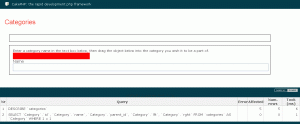 [/caption]
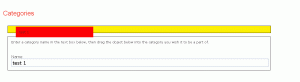 [/caption]
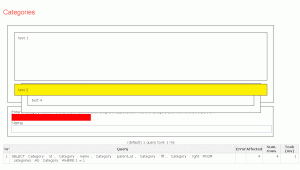 [/caption]
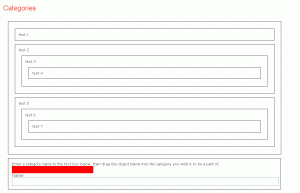 [/caption]
CREATE TABLE `categories` (
`id` int(10) unsigned NOT NULL auto_increment,
`name` varchar(255) NOT NULL,
`parent_id` int(10) unsigned NOT NULL,
`lft` int(10) unsigned NOT NULL,
`rght` int(10) unsigned NOT NULL,
PRIMARY KEY (`id`)
) ENGINE=InnoDB DEFAULT CHARSET=latin1;
<?php
class Category extends AppModel {
 var $name = 'Category';
 var $actsAs = array('Tree');
}
?>
<?php
class CategoriesController extends AppController {
 var $name = 'Categories';
 var $helpers = array('Html', 'Form', 'Javascript');
 function index() {
  // if it's ajax, set ajax layout
  if (!empty($this->params['named']['isAjax']))
   $this->layout = 'ajax';
  $categories = $this->Category->find('threaded');
  $this->set(compact('categories'));
 }
 function add() {
  if (!empty($this->data)) {
   $this->Category->create();
   if ($this->Category->save($this->data)) {
    $this->Session->setFlash(__('The Category has been saved', true));
    //$this->redirect(array('action'=>'index'));
   } else {
    $this->Session->setFlash(__('The Category could not be saved. Please, try again.', true));
   }
  }
  $this->render(false);
 }
 function edit($id = null) {
  if (!$id && empty($this->data)) {
   $this->Session->setFlash(__('Invalid Category', true));
   $this->redirect(array('action'=>'index'));
  }
  if (!empty($this->data)) {
   if ($this->Category->save($this->data)) {
    $this->Session->setFlash(__('The Category has been saved', true));
    //$this->redirect(array('action'=>'index'));
   } else {
    $this->Session->setFlash(__('The Category could not be saved. Please, try again.', true));
   }
  }
  if (empty($this->data)) {
   $this->data = $this->Category->read(null, $id);
  }
  $this->render(false);
 }
 function delete($id = null) {
  if (!$id) {
   $this->Session->setFlash(__('Invalid id for Category', true));
   $this->redirect(array('action'=>'index'));
  }
  if ($this->Category->del($id)) {
   $this->Session->setFlash(__('Category deleted', true));
   $this->redirect(array('action'=>'index'));
  }
 }
}
?>
<?php
$javascript->link(array('jquery', 'jquery-ui'), false);
?>
<script>
 $(document).ready(function(){
  //set up the droppable list elements
  $("ul li").droppable({
   accept: ".ui-draggable",
   hoverClass: 'droppable-hover',
   greedy: true,
   tolerance: 'pointer',
   drop: function(ev, ui) {
    var dropEl = this;
    var dragEl = $(ui.draggable);
    // get category id
    var parent_id = this.id.substring(9);
    // get category name
    var category_name = $(dragEl.find("span").get(0)).html();
    if (!isNaN(parent_id) && category_name.length > 0) {
     var data;
     var url = "categories/";
     // see if we are adding or editing
     if (dragEl.attr("id").substring(0, 9) == "category_") {
      // get the current id
      var id = dragEl.attr("id").substring(9);
      data = { 'data[Category][id]': id, 'data[Category][name]': category_name, 'data[Category][parent_id]':
parent_id };
      url += "edit";
     } else {
      data = { 'data[Category][name]': category_name, 'data[Category][parent_id]': parent_id };
      url += "add";
     }
     // post to our page to save our category
     $.post(url, data, function() {
      $.get("categories/index/isAjax:1", function (data) { destroyDraggable(); $("#content").html(data);
setupDraggable(); });
     });
    }
   }
  });
  setupDraggable();
 });
 function updateDragBox() {
  $($("#ui-draggable").find("span").get(0)).html($("#CategoryName").val());
 }
 function setupDraggable() {
  $("#ui-draggable").draggable({
   containment: '#categories',
   stop: function(e,ui) {
    $(this).animate({ left: 0, top:0 }, 500);
    $(this).html('');
   }
  });
  $("#category_0").find("li").draggable({
   containment: '#categories',
  });
 }
 function destroyDraggable() {
  $("#ui-draggable").draggable('destroy');
  $("#category_0").find("li").draggable('destroy');
 }
</script>
<style>
#categories {
 padding: 1em 0.5em;
 width: 90%;
}
ul li {
 background-color: #FFFFFF;
 border: 1px solid #000000;
 list-style: none;
 margin: 1em 0;
 padding: 1em;
}
ul li.droppable-hover {
 background-color: #FFF000;
}
#category {
 border: 1px solid #000000;
 margin-top: 1em;
 padding: 1em;
 width: 97%;
}
#ui-draggable {
 background: #FF0000;
 padding: 1em;
 position: relative;
 width: 300px;
}
</style>
<h2><?php __('Categories');?></h2>
<ul id="categories">
 <li id="category_0">
  <?php echo $this->element('draw_category', array('data' => $categories)); ?>
 </li>
 <div id="category">
  <p>Enter a category name in the text box below, then drag the object below into the category you wish it to be a part of.</p>
  <div id="ui-draggable"><span></span></div>
  <?php echo $form->input('Category.name', array('onkeyup' => 'updateDragBox()')); ?>
 </div>
</ul>
<?php if ($data): ?><ul>
 <?php foreach ($data as $category): ?><li id="category_<?php echo $category['Category']['id']; ?>"><span><?php echo $category['Category']['name']; ?></span>
 <?php echo $this->element('draw_category', array('data' => $category['children'])); ?>
 </li><?php endforeach; ?>
</ul><?php endif; ?>
Related Posts

Tutorials
Learn how to code in HTML, CSS, JavaScript, Python, Ruby, PHP, Java, C#, SQL, and more.